

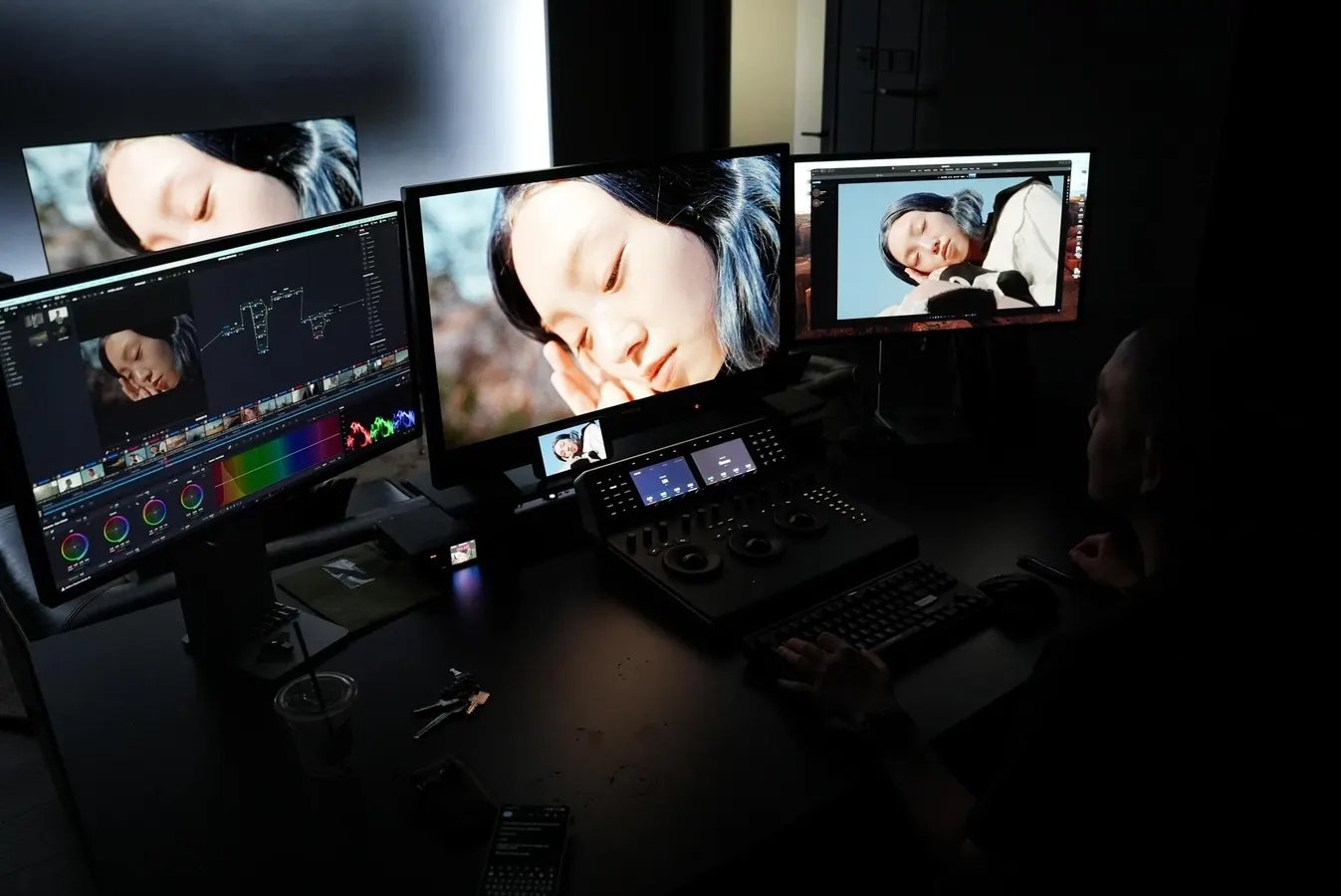
Hong Kong colorist Matthew Chan of Ixagon using a Mac Studio Display alongside a $13,000 monitor to color grade.
Ben Sin
Apple computers have long been favorites of creative professionals – virtually every DJ, video editor, or photographer I’ve seen or met work off a Mac – and in 2026 the U.S. tech giant seems keen to flesh out its entire ecosystem for creatives. Earlier this year Apple introduced the “Creator Studio,” a subscription-based suite of services that covers everything from video editing to music production to graphic design, and a month later launched the Studio Display XDR, a 27-inch 5K MiniLED display that Apple calls “the world’s best pro display.”
What makes the display so appealing to creatives? For one, it features a cutting-edge MiniLED display that produces much deeper blacks, wider contrast and higher brightness than conventional LCD panels, and Apple calibrates each display in its factory to cover 100% of the P3 wide color gamut and Adobe RGB color space. This makes the display not just gorgeous to look at, but more important to professionals, color accurate.
Official product render of the Studio Display XDR
Apple
I recently met Hong Kong-based colorist Matthew Chan (better known online under the pseudonym fmlik), who co-runs a boutique coloring studio named Ixagon, and he’s been using the Studio Display XDR as part of his triple monitor setup. He says the $3,300 Studio Display XDR is more color accurate than the previous generation Studio Display. The new one, in fact, gets close enough to his high-end FSI XMP310 monitor which retails at $13,000.
The triple-monitor setup of Matthew Chan, a professional colorist who works with major global brands and agencies. The Apple Studio Display XDR is on the left, with the FSI XMP310 in middle, and the older generation Studio Display on the right
Ben Sin
Chan does color grading work for clients from across the globe (recent collaborations include Canon, Nike, OnePlus, Shiseido, and various Asia-based musicians), so he often has to show clients his work remotely, via the software Louper.
“Since the clients aren’t in the room with me, it’s [crucial] they have a monitor that can see colors accurately,” says Chan.
It would be unrealistic to request clients to purchase his $13,000 high-end pro-grade monitor, so instead he recommends the Studio Display XDR.
“If they have [Studio Display XDR], then I know when they see the footage I’ve color graded, it is accurate to my vision.”
Chan also concedes that using an Apple monitor has other benefits, because most content will ultimately be consumed by the masses on iPads or iPhones.
A screengrab from a project Chan is currently color grading. The project is credited to Sam Chan (director of photography) and Carmen Cheng (producer)
Matthew Chan/Ixagon
Color grade footage from a project commissioned to Chan by Shell Malaysia.
Matthew Chan/Ixagon, Shell Malaysia
A still from a music video by Hong Kong singer Joey Yung, color graded by Chan.
Matthew Chan/Ixagon
Another benefit of using the Studio Display XDR: it packs a six speaker system and a 12-megapixel webcam with Apple’s “Center Stage” feature, which makes doing video calls with clients easier.
The Studio Display XDR (left)
Ben Sin
While Chan says the Studio Display will not replace his $13,000 FSI XMP310 as his main reference monitor, the Studio Display XDR will have a key role as the second monitor. But he says for those who are not doing client work, those who are perhaps dabbling in color grading as a hobby, the Studio Display XDR is good enough.
The $3300 Studio Display XDR (right) next to the $13,000 FSI XMP310
Ben SIn
The Studio Display XDR seems to be the so-called “Pro-sumer” product, meaning it’s good enough for the pros, while also being accessible to the masses.
